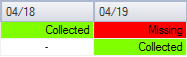
The Analyst Overview is the default data view in the Dashboard control, and its information is a distillation of the information contained in the other data view options.
This is the most comprehensive data view available in the Dashboard, and shows record values based on the hierarchical record status of the data contained, to provide a concise view into the overall state of your system data and help guide the workflow of resolving system issues. At a glance, this view shows an analyst what system issues to address in order to close (for FULL mode) or export (for REPOSITORY mode) desired data. Additional views are useful to help investigate identified issues in further detail.
In the Analyst Overview data view, the relative precedence of records is color coded based on its status, to clarify at a high level what data issues require analyst attention. Since multiple status values may apply to a record at a specific time, the status with the highest precedence is shown first. As issues are resolved, the next highest applicable status is shown.
For liquid device Nodes that do not support periodic data, but support Batch and/or Ticket data, a selected time span may not contain records, therefore the data status field does not apply. In such cases a dash "-" is shown in the grid for those time span cells, instead of a status value. The data status is shown for liquid device Nodes supporting periodic metering data within the time span.
The hierarchy of what record states will be displayed for a selected record is listed sequentially in the following tables, from first shown to last shown, according to the data mode view selected. Once records of a specific status are addressed, the status with the next highest applicable precedence will be displayed in the grid.
Note: All status values are not applicable to all Node types, e.g. liquid Batch and Ticket Nodes support only "Collected" and "Missing" status (and "Exported" for systems in REPOSITORY mode). The relative precedence of the record status still applies as shown in the tables.
For systems operating in FULL mode, the record status value is displayed according to the hierarchy in the following tables, for either device or station data views.
Note: There is a slight variation in the record status precedence depending on the selected data mode you are viewing (device or station), and depending on whether you are looking at a device or group Node.
Status value precedence for FULL: Device Data mode, from highest to lowest.
| FULL mode Status Precedence - Device Data Mode | |
|---|---|
|
Device Nodes |
Group Nodes |
|
Missing |
Missing |
|
Unavailable |
Unavailable |
|
GA exceptions |
GA exceptions |
|
GA pending* |
GA pending* |
|
Exceptions** |
Exceptions** |
|
Low quality** |
Low quality** |
|
PPAs** |
PPAs** |
|
Closed |
Edited (Device level) |
|
Edited (Device level) |
Collected |
|
Collected |
Closed |
*Appears only when the gas analysis (GA) record with the most recent effective date/time has not yet been sent to the device successfully.
**If configured as a close period requirement in the administrative options. See Configuring System Options for more information.
Status value precedence for FULL: Station Data mode, from highest to lowest.
| FULL mode Status Precedence - Station Data Mode | |
|---|---|
|
Device Nodes |
Group Nodes |
|
Missing |
Missing |
|
GA exceptions |
GA exceptions |
|
GA pending* |
GA pending* |
|
Exceptions** |
Exceptions** |
|
Low quality** |
Low quality** |
|
PPAs** |
PPAs** |
|
Closed |
Edited (Station level) |
|
Edited (Station level) |
Open |
|
Open |
Closed |
*Appears only when the gas analysis (GA) record with the most recent effective date/time has not yet been sent to the device successfully.
**If configured as a close period requirement in the administrative options. See Configuring System Options for more information.
For systems operating in REPOSITORY mode, the record status value is displayed according to the hierarchy in the following table.
Note: There is a slight variation in the record status precedence depending on whether you are looking at a device or group Node.
Status value precedence for REPOSITORY mode, from highest to lowest.
| REPOSITORY mode Status Precedence | |
|---|---|
|
Device Nodes |
Group Nodes |
|
Missing |
Missing |
|
Unavailable |
Unavailable |
|
GA exceptions |
GA exceptions |
|
GA pending* |
GA pending* |
|
Exported |
Collected |
|
Collected |
Exported |
*Appears only when the gas analysis (GA) record with the most recent effective date/time has not yet been sent to the device successfully.

|
|
|

